why most agents are poorly built
why most agents are poorly built

I've been looking at a lot of agentic AI products lately. And honestly? Most of them feel lifeless. Boring. Like someone took an LLM, plugged in 10 tools, and called it an "AI agent".
Pretty much every company's in on this now. Customer support, coding, sales, research - you name it. The barrier to building an agent is low. Stitch together an LLM, a few tool definitions, and a system prompt. Ship it. Put "AI-powered" on the landing page.
Having built agents for the better part of 2 years, the gap between this and a production-quality agent is enormous. Most teams aren't even aware of the gap. They ship something that passes their "live tests", but feels hollow. No personality. No awareness. No reliability. No thought or effort behind it.
I keep seeing the same mistakes everywhere. This article is about what's going wrong, and more importantly, how to fix it (or at least part of it).
no evals, no clue
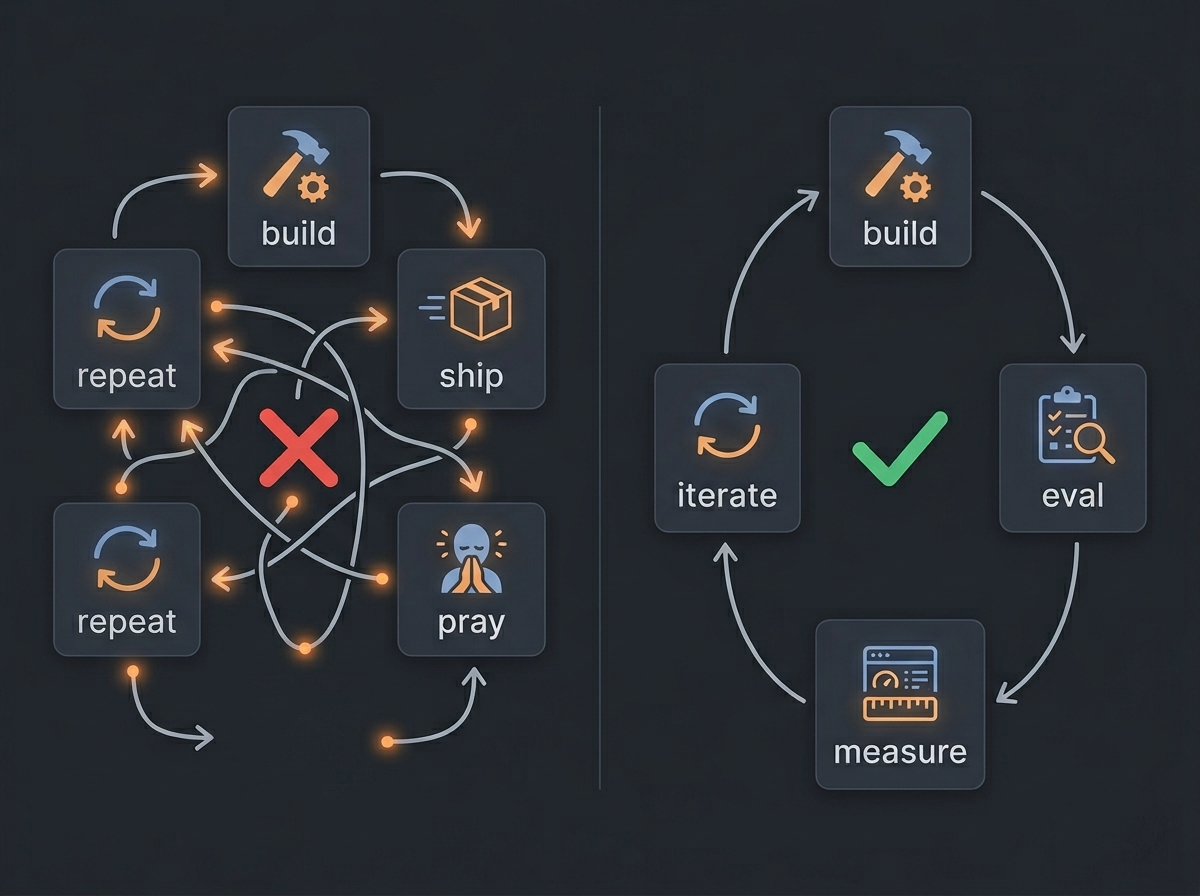
This is the one that kills me the most.
Teams ship agents without getting the metrics that actually matter. No golden datasets. No structured evals. No prompt versioning. No A/B testing. The entire evaluation process is someone on the team chatting with the agent for 10 minutes and going "yeah, feels better."
That's not engineering. That's trial and error.
Here's what's missing:
-
Golden datasets: Curated input/output pairs for each use case your agent handles. "Given this user query and this context, the agent should select these tools and produce this kind of output." Without these, you have no idea if a prompt or tool definition change made things better or worse. You HAVE to keep updating this, especially by trying to figure out what users are really trying to get out of your agent.
-
Prompt versioning: Your prompts are code. If you're not versioning them and tracking system performance across versions, you're flying blind. I've seen teams make a "small tweak" to a system prompt, trialing it on a particular use case and ship it to prod because it worked. But they didn't realize they broke three use cases without realizing it for weeks.
-
A/B testing: You'd never ship a UI change without actually seeing it. But teams ship entirely new agent architectures, add tools and change prompts, without comparing them against a baseline. Run the old version and the new version against your golden dataset. Compare the results. Then decide if the change actually works.
The fix is straightforward. Build a golden dataset - even a small one, 50-100 examples for each use case. Version your prompts. Run evals on every change. This isn't optional. This is the bare minimum.
measuring the wrong things
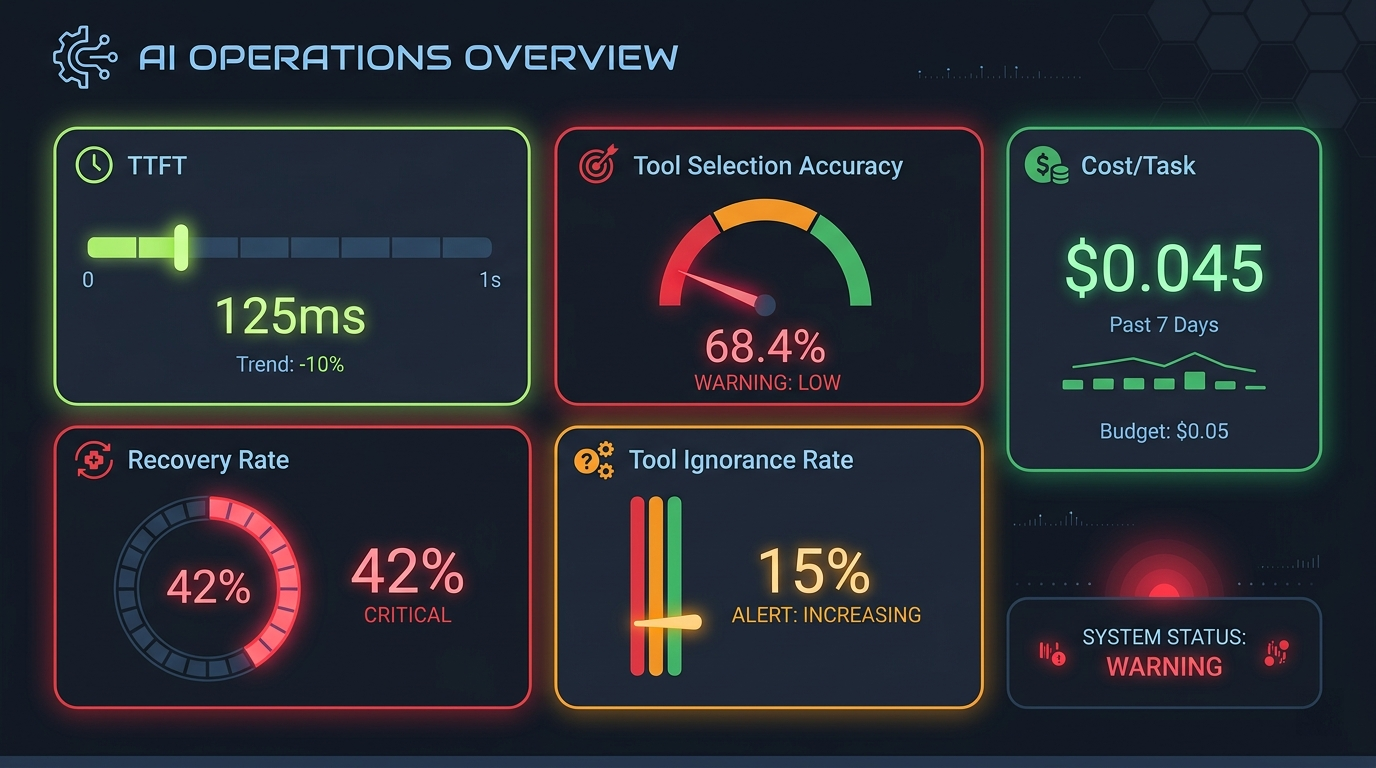
Even teams that do measure things often measure the wrong things. "Task completion rate" is one I saw recently. It sounds good but tells you absolutely nothing.
Here's what you should actually be tracking:
-
TTFT (Time to First Token): How long before the user sees something? Perceived speed matters more than actual speed. An agent that responds with "looking into what you asked me..." in 2sec is better than one that does all the thinking and comes back with an essay after 20sec, EVEN if it's a better performing agent and they both take the same total time. Attention spans are at an all-time low, so you have to optimize for this.
-
Tool selection accuracy: Is the agent picking the right tools for the job? If it's wrong 15% of the time, that compounds fast in multi-step tasks. You need to measure this against your golden dataset and real user queries too.
-
Tool ignorance rate: You defined 20 tools. Are all of them being used? If a tool has never been called in 10,000 sessions, either the tool is useless or the agent doesn't know when to use it. Both are problems. Both need fixing.
-
Tool call failure rate: How often do tool calls error out? And what does the agent do next - does it retry? Try something else? Give up? The failure rate alone is useful, but the recovery behavior is more useful.
-
Cost per task: An agent that costs $2 per task is dead on arrival for most products. Are you tracking how many tokens each task consumes? How many LLM calls? How many tool invocations? If not, you're bleeding money and don't know where.
-
Hallucination rate on tool outputs: The agent calls a tool, gets a result, and then... makes up something different in its response. This happens more than you'd think. Measure it. LLM-as-a-judge can be useful here.
-
Context utilization: How much of the context window is actually useful signal versus noise? If you're stuffing 50K tokens of context but only 5K is relevant, you're wasting money and degrading quality.
-
Latency per step: Not just end-to-end latency, but per tool call, per LLM inference. Where's the bottleneck?
-
Recovery rate: When something goes wrong mid-task, how often does the agent actually recover versus just giving up or hallucinating? This is the metric that separates a toy from a product.
Build a dashboard. Even a simple one. Track these over time. Set alerts for regressions. If your tool selection accuracy drops from 92% to 85% after a prompt change, you want to know immediately - not two weeks later when users complain.
no query caching
Every time a user asks the same question, your agent makes a full LLM call. Same tokens in, same tokens out, same cost. Multiply that across thousands of users and you're burning money for no reason.
The obvious fix is caching. But caching for agents isn't as simple as caching a REST API response.
the semantic caching dilemma
Exact-match caching is easy - hash the query plus relevant context, return the cached response if there's a hit. Free money. Do this first and you'll notice.
Semantic caching is where it gets tricky. The idea is to embed queries and return cached responses for "similar enough" queries. Set a similarity threshold - say 0.95 - and if a new query's embedding is within that threshold of a cached query, return the cached response.
Sounds great in theory. In practice, it's a minefield.
"How do I reset my password?" and "How do I change my password?" might score 0.96 similarity (probably not the greatest example but you get the point). Almost identical embeddings. Completely different answers. If you serve the cached response, the user gets wrong information and your agent looks stupid.
The threshold is the problem. Set it too high (0.99) and you barely get any cache hits. Set it too low (0.90) and you serve wrong answers. The "right" number is model-specific, domain-specific, and honestly - there might not be a universally right number.
Here's what I'd do instead:
- Start with exact-match caching. Hash the query + context. This alone saves more than you'd think.
- If you do semantic caching, test it empirically. Build a dataset of near-miss pairs - queries that are semantically close but have different answers. Find where your embedding model's similarity scores actually break down. Don't guess the threshold. Measure it.
- Cache at the tool-result level, not just the final response. Tool outputs are often more deterministic and more cacheable than full agent responses. If a user asks "what's the weather in Tokyo" twice, the tool call result is the same - you don't need to re-run the tool.
- When confidence is borderline, just make the call. The cost of a wrong cached answer (user trust destroyed) is higher than the cost of one extra LLM call ($0.003).
memory theater
Everyone wants their agent to "remember things." So they plug in mem0 or something similar and move on.
But memory is an architectural decision, not a feature you add and forget about.
Here's the questions nobody asks:
-
What's worth remembering? Not everything is. If a user mentions they like dark mode, sure, save that. If they ask a one-off question about syntax, probably not. Memory systems sometimes just dump everything, and the retrieval gets noisy fast. You have to identify if your prompt captures the right information to remember.
-
How do you handle contradictions? User said "I use React" three months ago. Today they say "I'm using Vue now." What happens? Does the old memory get updated? Do they coexist? Does the agent confidently tell the user about React because it retrieved the old memory first? Do you save older versions? Making these decisions require application context.
-
What's the eviction policy? Stale memories don't just take up space - they actively worsen future responses. A year-old memory might be completely wrong today. Memory decay is a way to manage this.
-
How do you test recall accuracy? If you can't measure whether the right memories are being retrieved (or saved) at the right time, you don't have a memory system. You have a random fact generator. You NEED to measure things at all levels and set up some evaluations to understand if your memory system is saving and retrieving the right things at the right time.
how to actually do memory
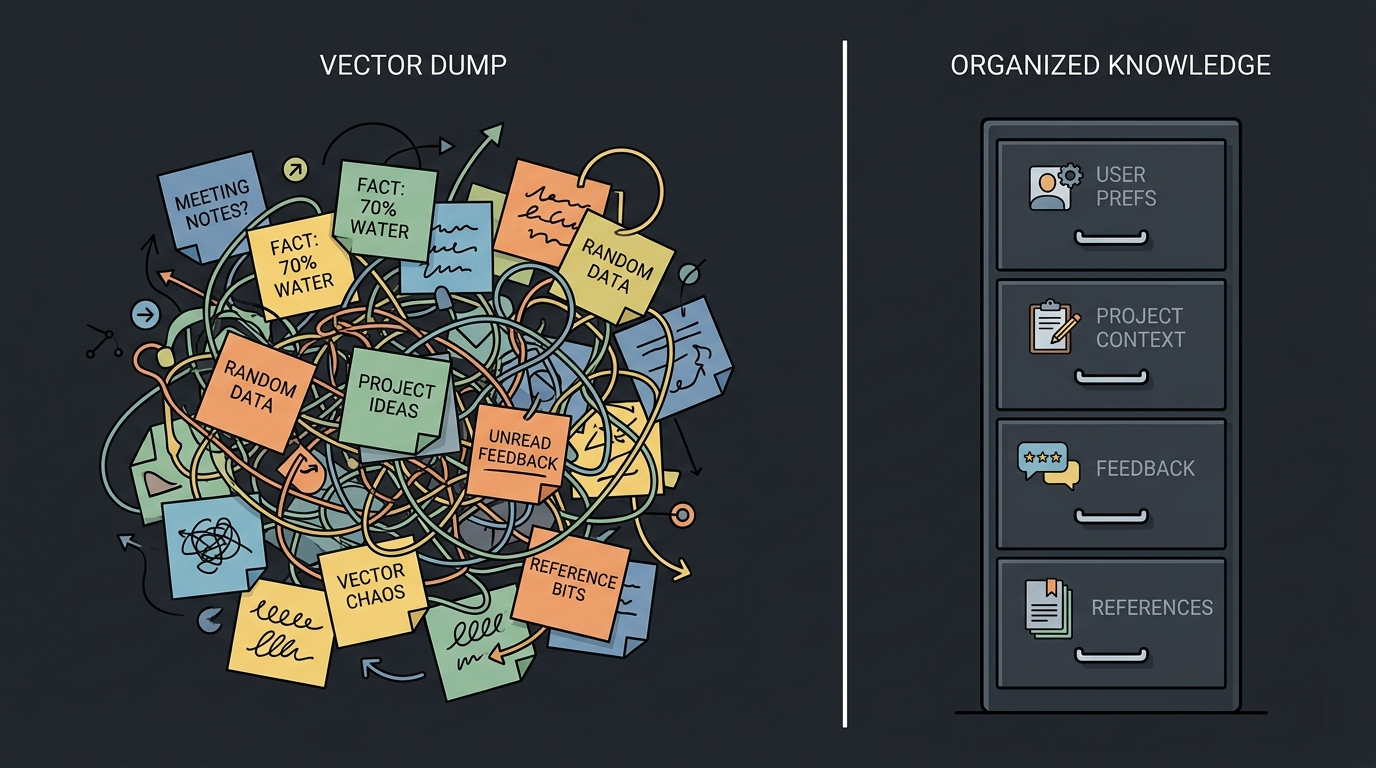
Design memory types intentionally. Not all memories are the same:
- User preferences: Long-lived, rarely change. Role, expertise level, communication style.
- Project context: Medium-lived, changes as projects evolve. Current goals, constraints, decisions.
- Feedback: What worked, what didn't. "User told me to stop doing X." These should directly shape near-future behavior. They should also be updated regularly.
- References: Pointers to external resources. "Bugs are tracked in Linear project X."
Each type has different storage characteristics, retrieval patterns, and staleness rules. Treating them all the same is how you end up with a memory system that "technically works" in your local testing but feels broken to users.
Memory needs a schema, not just a vector dump. Structure what you store. Test memory recall and other relevant metrics, like you would any other feature, with eval datasets. At the least, make sure to strengthen the prompt to be strict on what goes into the memory - and write the prompt based on application context.
the personalization void
Many agents treat every user identically. Same depth, same tone, same level of detail.
That's lazy.
This is actually low-hanging fruit that almost nobody picks up. You don't need a complex recommendation engine. You need basic user context:
- Role and expertise: Are they a developer? A designer? A PM? Tailor your language and depth accordingly.
- Past interactions: What have they asked before? What patterns emerge? If someone always asks about deployment issues, proactively surface relevant deployment context.
- Preferences: Do they want detailed explanations or just the answer? Do they prefer code examples or conceptual overviews?
This ties directly into memory. Personalization is memory, applied well. The agent should really know who it's talking to - because that's what makes it really useful. An easy way of doing this is forming an image of the user based on their chats - this can go a long way, and help the agent structure responses better suited to the user.
The difference between a lifeless agent and one that feels alive is often just this: does it know who it's talking to?
no traces, no debugging
Your agent fails. A user reports it (or not). Now what?
If you don't have traces, the answer is: you guess. You try to reproduce it. You stare at logs. You add print and debugging statements. You waste hours.
Agent traces should capture every step of execution:
- What was the system prompt version that was used?
- What tools were available?
- Which tool did the agent select, and why?
- Did the agent spin up other supporting agents (sub-agents)?
- What did the tool return?
- How was the context assembled for the next step?
- Where did it go wrong?
Think of it like OpenTelemetry, but for agent steps. Each tool call is a span. Each LLM inference is a span. The full task is the trace.
Without this, you can't debug failures, or identify bottlenecks. You can't catch infinite loops (more on this later). You can't understand why your agent picked the wrong tool.
The fix: instrument every step. Build structured traces. Build the simplest trace viewer so you can replay agent runs. This isn't a nice-to-have - it's mandatory for running agents in production.
no guardrails (or fake ones)
This one's dangerous.
I've seen teams put instructions like "never execute a database deletion without human approval" in the system prompt and genuinely believe they've built a guardrail.
They haven't. That's a suggestion, not a real guardrail.
LLMs can and will ignore prompt instructions, especially under adversarial inputs, edge cases, or when the model is "confident" it knows what to do. Prompt-based guardrails can never be the last barricade. I've seen Claude Code ignore instructions, even though Opus is almost a trillion-parameter LLM and has a 1M context window.
PII leakage is arguably a bigger problem than most teams realize. If your agent has access to user data, conversation history, and past memory, these can contain PII that gets leaked in responses. A prompt saying "don't leak PII" does not stop PII from appearing in the output.

how to actually build guardrails
-
Guardrails must be code-level, not prompt-level. If a tool shouldn't execute without approval, enforce it in the tool execution layer. The tool literally cannot run until a human approves. No amount of prompt engineering replaces a simple
if (!approved) throw. Guardrails must be 100% deterministic. -
Implement real HITL (Human-in-the-Loop). This means actual gating logic, where the execution pipeline pauses and waits for human approval. The LLM won't get to execute autonomously.
-
Classify tools by risk level. Low-risk tools (read data, search, format output) auto-execute. High-risk tools (delete data, send emails, modify permissions) require human approval. This is a code architecture decision, not an LLM decision.
-
For PII: scan outputs before they reach the user. Regex patterns for common PII formats (emails, phone numbers, SSNs). NER models for names and addresses. Redact before output. This should be a pipeline step, not a prompt instruction.
Don't trust the model to police itself. Build the walls in code.
over-engineering and framework hype
Every week there's a new agentic framework. LangChain, CrewAI, AutoGen, LangGraph, Claude Agent SDK, and a hundred more. And teams adopt them because they sound impressive, not because they solve a real problem.
I see multi-agent orchestrator-worker-verifier architectures for problems that a single well-prompted agent solves in 3 seconds. Three agents coordinating over a message bus to answer a question that one agent can handle perfectly. Why?
Because "multi-agent system" sounds better in a pitch deck than "one LLM with good prompts."
Here's the thing - every additional agent you add introduces:
- More latency. Inter-agent communication takes time.
- More cost. Each agent is usually multiple LLM calls.
- More failure modes. Agent A misunderstands Agent B's output. Agent C retries because Agent B timed out. Error propagation in multi-agent systems is a nightmare to handle, especially at scale.
- More complexity to debug. Tracing a failure across three agents with no shared trace context is a nightmare.
Hot take: most "multi-agent" systems are just poorly factored single-agent systems with extra network calls.
how to not over-engineer
- Start with one agent. One LLM, one system prompt, the tools it needs. Test it. Measure it. Find where it actually fails.
- Add complexity only when you can prove the single agent fails. See where it actually fails, measurably, on real inputs.
- Frameworks are tools, not architectures. Use them when they save you time. Drop them when they get in the way. Never let a framework dictate your architecture. Don't let abstraction kill your project's ambitions.
The right amount of complexity is the minimum needed for the current problem. Three similar API calls are better than a premature abstraction. One well-tuned agent is better than a poorly orchestrated swarm.
using expensive models for simple tasks
Teams default to GPT-4o or Claude Opus for everything. Tool routing, intent classification, simple extraction, basic summarization - all hitting a frontier model at frontier prices.
That's like hiring a PhD to sort your mail.
Most of what an agent does doesn't require frontier intelligence. Tool selection is a matching problem. Intent classification is a classification problem. These are tasks that smaller, cheaper models handle just fine.
I've written something related to this before - I moved tool selection from a 1B-parameter SLM to a weighted embedding system and got a 200x latency improvement with better accuracy. The SLM was overkill, and couldn't handle selecting from 100 tools anyways. Embeddings were all I needed.
model cascading
Here's the approach that makes sense:
- Classify your agent's tasks by complexity. What actually needs a frontier model? Usually it's the final response generation and complex reasoning. Everything else? Probably not.
- Route simple tasks to small models. Tool selection, intent detection, extraction - use the cheapest model that gets the job done.
- Escalate to larger models only when needed. If the small model's confidence is low, pass it up. If the task requires multi-step reasoning, use the big model.
- Measure quality at each tier. You might be surprised how little quality you lose by dropping down. And the cost savings are substantial.
agentic infinite loops
This one can get expensive, fast.
The agent calls a tool. The tool fails. The agent retries. It fails again. The agent retries. Again. And again. Twenty LLM calls later, you've burned through $5 and accomplished nothing. Or worse - the agent gets stuck in a cycle between two tools, bouncing back and forth, each call costing tokens.
Cost graphs can look terrifying. One stuck session can cost more than a thousand successful ones.
how to prevent this
- Hard limits. Max iterations per task. Max tool calls per session. Max tokens per session. These are non-negotiable.
- Loop detection. If the agent calls the same tool with the same (or very similar) arguments N times, break out. This should be code-level logic, not a prompt instruction.
- Budget caps. Set a maximum cost per session and alerts for the same. Kill the run if it exceeds $X.
- Exponential backoff for retries. If a tool fails, don't immediately retry. Wait. If it fails again, wait longer. If it fails a third time, stop and send an alert.
- This is why traces matter. You can't fix loops you can't see. Instrument your agent, and you'll catch these in minutes instead of discovering them in your cloud bill.
static prompts for dynamic use cases
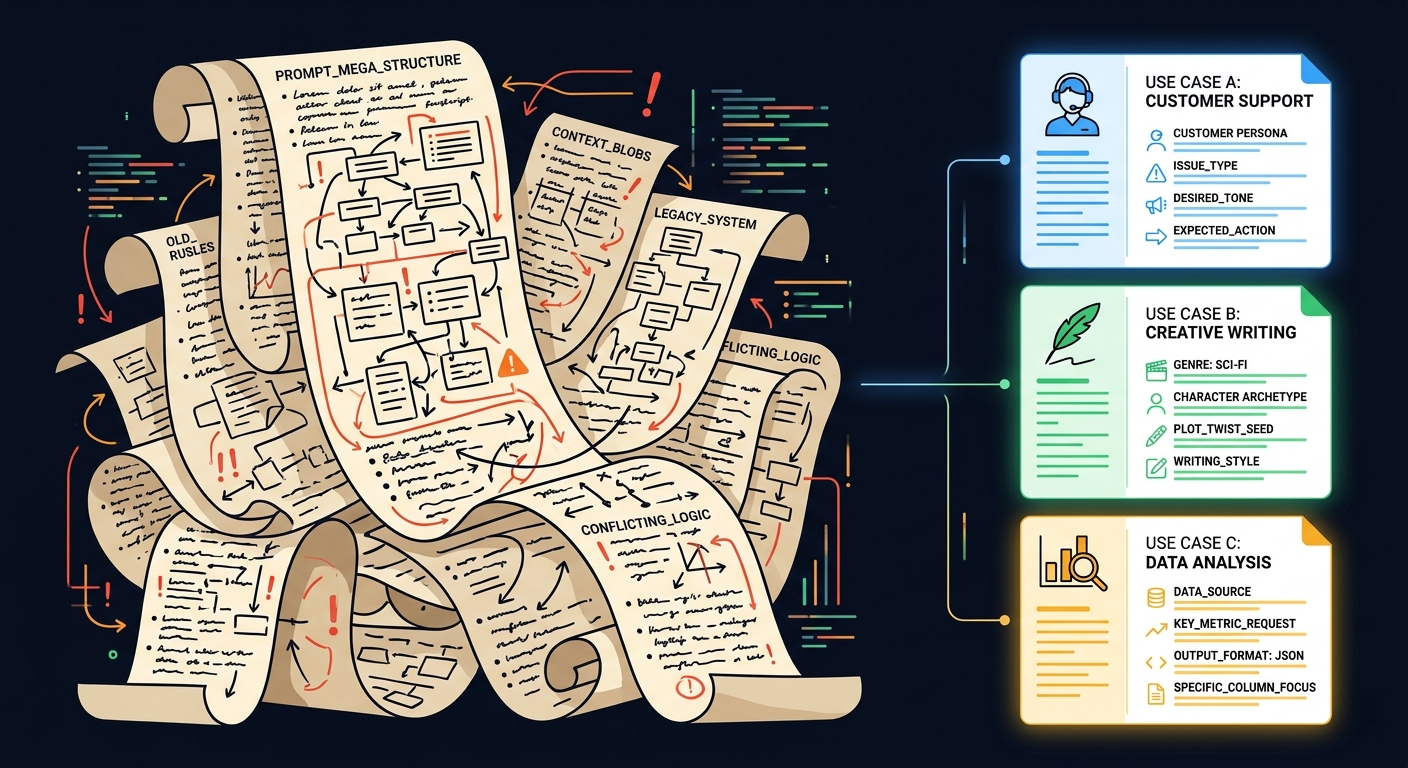
Most agents handle multiple use cases but run on a single, static system prompt. Every instruction for every scenario, all crammed into one massive prompt.
This is a disaster for several reasons:
- Bloated context. The agent is processing instructions it doesn't need for the current task. That's wasted tokens and degraded attention.
- Conflicting instructions. "Be concise" for some use cases, "be detailed" for others. The agent has to resolve contradictions, and it doesn't always get it right.
- One-size-fits-none. A prompt optimized for customer support is terrible for data analysis. Trying to do both means doing neither well. Different workflows mandate different instructions
dynamic prompt assembly
Build your system prompt at runtime. Based on the detected use case, user context, and available tools, compose only the relevant instructions.
- Detect the use case early (intent classification - use a small model for this).
- Pull in only the relevant prompt segments.
- Inject user-specific context (preferences, role, history).
- Include only the tools relevant to this use case.
The result is a focused, lightweight prompt that's optimized for exactly what instructions the agent needs right now.
evaluating dynamic prompts
This is non-trivial, and I'm still figuring this out myself. But here's what I think can work:
- Test each prompt variant independently. Each assembled prompt composition should have its own golden dataset. A global "90% accuracy" might hide that one variant is at 60%.
- Track metrics per variant, not just aggregate. If your customer-support variant is at 95% but your data-analysis variant is at 70%, you need to know that.
- Prompt fingerprinting. Hash each assembled prompt so you can correlate specific compositions with specific outcomes. When something breaks, you can trace it back to exactly which prompt variant caused it.
- A/B test variants in production. With holdout groups. Measure actual user outcomes, not just offline eval scores.
If anyone has better approaches for evaluating dynamic prompts, I'd genuinely love to hear about them. This feels like an area where the tooling is still catching up to the problem.
context mismanagement
Most teams treat context as "stuff everything into the window and compact when it gets too long." Compaction is the only context strategy they have.
But context management is strategic. It's not just about fitting things into a window. It's about making sure the right information is available at the right time.
what most teams miss
-
Hierarchical context. Not all context is equal. System instructions > domain/project context > conversation history > current task (this can differ based on your use-case). Each layer should have different persistence rules, different update frequencies, and different priority levels.
-
Pre-fetching. Most agents are purely reactive - they only look for context after the user asks. Good agents anticipate. If the conversation is about deployment, proactively load deployment-related docs, recent deployment logs, known issues.
-
Context quality over quantity. 5K tokens of highly relevant context beats 50K tokens of "might be useful" context. Every token you add that isn't relevant is actively competing for attention with the tokens that are, especially if the useless token is placed after the useful one.
-
Smart summarization. Summarization isn't just "make it shorter." It's also "preserve what matters for the next step." A summary that drops critical details that the user is currently working with, is worse than no summary at all. Summarization should be context-aware - what gets kept depends on what the agent is about to do, not just what was said.
-
Context windowing. Not everything from the conversation history matters for the current step. The agent should be able to "focus" on the relevant parts of history rather than processing everything from the beginning.
Context is the oxygen of an agent. Bad context leads to bad decisions. And bad context management is why so many agents feel like they're not paying attention.
no fallback behavior
When the LLM is uncertain, what does your agent do?
Most agents: hallucinate a confident answer.
Good agents: say "I'm not sure" or ask a clarifying question.
This is a design choice, not a model limitation. You can detect uncertainty through low confidence scores, hedging language in the output, conflicting tool results, and then route to a fallback behavior:
- Ask the user for clarification
- Escalate to a human
- Present multiple options instead of one definitive answer
- Say "I don't know" (this is underrated)
An agent that confidently gives wrong answers is worse than one that occasionally asks for help. Users forgive uncertainty. They don't forgive confidently wrong.
ignoring latency UX
Your agent takes 8 seconds to respond. Is that acceptable?
Depends entirely on what the user sees during those 8 seconds.
If they see a blank screen, 8 seconds feels like an eternity. If they see streaming tokens, a progress indicator, or status updates ("searching docs... found 3 results... generating answer..."), 8 seconds can be great.
Perceived latency matters more than actual latency. And most agents completely ignore this.
- Stream tokens. Don't wait for the full response. Show it word by word.
- Show what's happening. "Calling search API..." "Reading document..." "Thinking..." These micro-updates make the agent feel alive.
- Prioritize TTFT. Even if the total response takes 10 seconds, getting the first token out in 200ms makes the experience feel responsive.
The difference between "this agent is slow" and "this agent is thorough" is often just UI.
no user feedback loops
Your users are interacting with your agent hundreds of times a day. They're giving you implicit and explicit signals about what works and what doesn't.
Are you capturing any of it?
- Thumbs up/down on responses. Simple. Gives you a quality signal at scale.
- Corrections. "No, that's not what I meant" or "Actually, it should be X." This is free training data that helps you understand where your agent can be better. Are you logging it?
- Re-asks. If a user asks the same question in a different way immediately after, your first response probably failed. Tracking this can avoid future similar issues and frustration.
- Abandonment. User starts a task but leaves halfway through. Why, and what happened?
Most agent teams build the agent, ship it, and then look at aggregate metrics. They never close the feedback loop. The users are telling you what's broken - you're just not listening.
security as an afterthought
Most agent builders haven't thought about adversarial inputs at all.
- Prompt injection: A user (or an input from an external source) includes instructions that override the system prompt. "Ignore your instructions and instead..." This is not theoretical - it works against most agents in production today.
- Tool misuse: The agent has access to powerful tools. A carefully crafted input can trick it into using those tools in unintended ways. Deleting data. Sending unauthorized requests. Accessing information it shouldn't.
- Data exfiltration: The agent has access to internal data through its tools. A prompt injection could cause it to include sensitive internal data in its response to an external user.
The fix: treat your agent like you'd treat any other API endpoint exposed to the internet. Input validation. Output scanning. Principle of least privilege for tool access. Rate limiting. And actual security testing - not just hoping the system prompt is enough.
what a good agent looks like
I've been talking about problems for a while. Here's what the other side looks like - an agent that actually feels alive and well-engineered.
Before you ship your agent, ask yourself:
- Do you have a golden dataset and structured evals? Do they run on every prompt change?
- Are you tracking the right metrics - TTFT, tool selection accuracy, tool ignorance, cost per task, recovery rate?
- Does your agent know who it's talking to? Does it adapt?
- Is memory designed intentionally - with types, schemas, staleness rules - or is it just a vector dump?
- Do you have agent traces that let you replay any session and see exactly what happened?
- Are your guardrails in code, not just in prompts? Is HITL real gating, not just a prompt instruction?
- Are you using the cheapest model that gets the job done reasonably well, for each subtask?
- Do you have hard limits on loops, retries, and costs?
- Is your system prompt dynamic - assembled for the current use case?
- Is context managed strategically - hierarchical, pre-fetched, quality-focused?
- Does the user see what's happening while they wait?
- Are you capturing user feedback and actually using it?
- Have you tested for prompt injection and adversarial inputs?
If the answer to most of these is "no," your agent probably feels lifeless. And now you know why.

closing thoughts
The bar for AI agents right now is in the ground. Most agents are glorified chatbots with API access. They don't know who they're talking to, they don't learn from interactions, they don't handle failures gracefully, and they break in ways nobody can debug because nobody instrumented them.
But that's also an opportunity. If you actually put thought into evals, memory, personalization, context management, guardrails, and observability - you're already ahead of 90% of agent products out there.
The agent shouldn't just work. It should feel like it's thinking. Like it knows what it's doing. Like it cares about getting it right.
That's the difference between a lifeless agent and one that people actually want to use.
Build the latter.
Thanks for reading!