how I manage stacked branches
how I manage stacked branches
I've worked on large, end-to-end features at Stealth Startup. Sometimes, PRs get huge (1000s of lines) and hence become hard to review. That's when I first learnt and started using stacked branches.
I want to document my experiences with stacked branches and how to deal with them effectively. Hopefully this helps someone manage stacked branches better.
what are stacked branches?
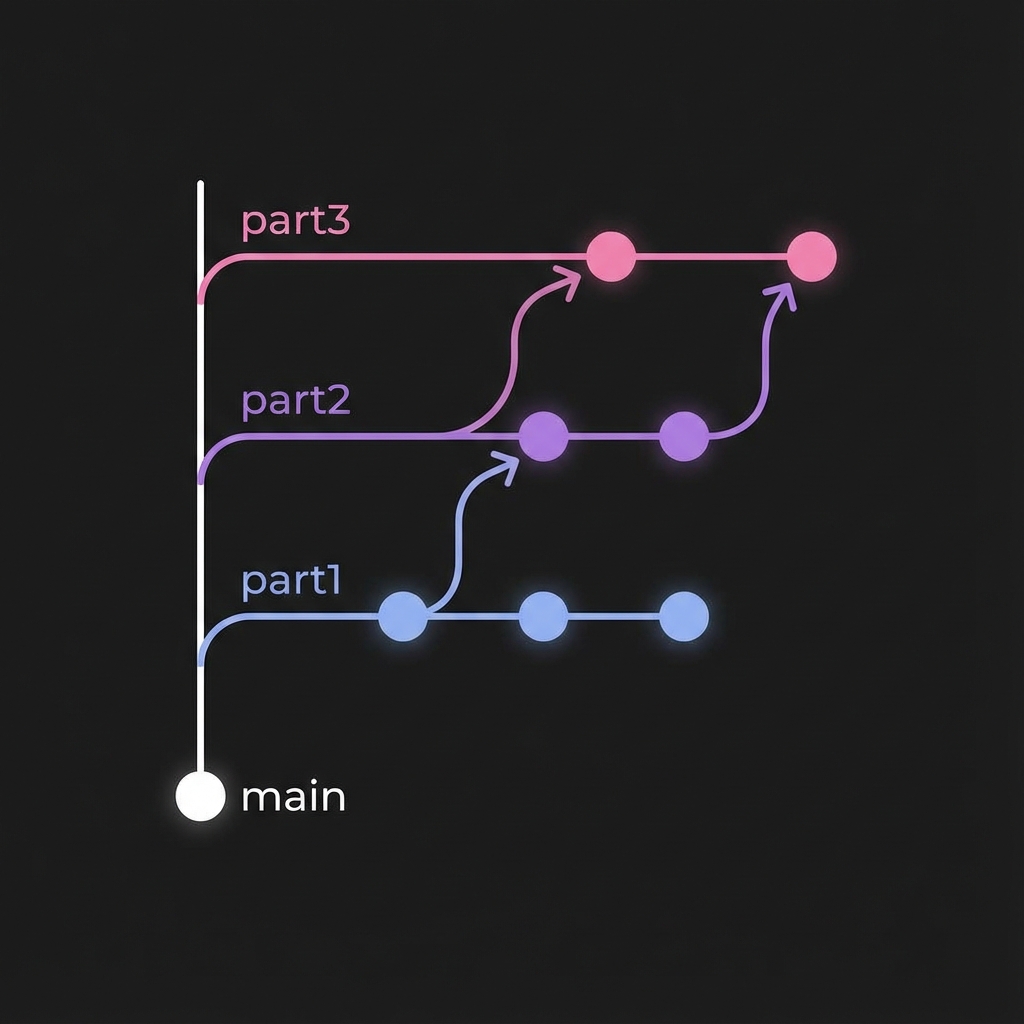
Stacked branches (also called dependent branches or chain branches) are a series of branches where each one builds on top of the previous. Instead of having one massive PR with thousands of lines changed, you break it down into smaller, more reviewable and manageable chunks.
why stacked branches?
The benefits are significant:
- Smaller, focused PRs — Reviewers (human and AI) can understand changes faster
- Faster review cycles — No more waiting for a 2000+ line PR to be reviewed
- Parallel development — Start working on Part 2 while Part 1 is in review - this is especially useful in the age of AI coding.
- Better commit history — Each PR has a clear, focused purpose
I've been using stacked branches for quite a while in order to put up smaller and easily reviewable PRs.
how to set them up
Setting up stacked branches is straightforward. You create branch A from main, do some work, then create branch B from branch A (not main!):
git checkout main && git pull
git checkout -b feature/A
# ... do work, commit, push ...
git checkout -b feature/B  # branched from A!
Simple enough. But here's where it gets messy.
the problem
Stacked branches can get messy. Let's say you've got this situation:
- Branch A has PR #1 open (in review)
- You're working on branch B, which was created from branch A
Now your reviewer comes back and says "hey, can you fix this thing in PR #1?"
You go to branch A, make the fix, and push. Cool. But now branch B is out of sync. It's still pointing to the old version of branch A.
And here's the kicker: when branch A eventually gets merged into main, branch B will still have all those commits from branch A mixed in. Your PR for branch B will look like a mess with commits that don't belong to it.
So how do you create a clean PR for branch B?
method 1: the cherry-pick way (beginner friendly)
If you're new to git, this is the most intuitive way to manage stacked branches. The idea is simple: create a fresh branch from main and just copy over the commits from branch B that you need.
step 1: find your commits
First, figure out which commits are actually yours in branch B:
git checkout feature/B
git log --oneline
You'll see something like:
a1b2c3d your commit 3 (B)
e4f5g6h your commit 2 (B)
i7j8k9l your commit 1 (B)
q3r4s5t feat: initial work (A)
...
Note down the hashes of commits that actually belong to branch B (in this case: a1b2c3d, e4f5g6h, i7j8k9l).
step 2: create a clean branch
git checkout main
git pull origin main
git checkout -b feature/B-clean
step 3: cherry-pick your commits
Now grab just the commits from B:
git cherry-pick i7j8k9l  # oldest one first
git cherry-pick e4f5g6h
git cherry-pick a1b2c3d
Or if they're consecutive, you can do it in one go:
git cherry-pick i7j8k9l^..a1b2c3d
step 4: push and update your PR
git push -u origin feature/B-clean
Now update your PR to point to the new branch, or close the old PR and open a new one.
Pros:
- Very explicit - you can see exactly what's happening
- Easy to understand for beginners
- Low risk of messing things up
Cons:
- Manual process, especially with many commits
- Creates new commit hashes (the commits are "copies")
method 2: the rebase way (one command)
If you're comfortable with rebase, this does the same thing but in one command:
git checkout feature/B
git rebase --onto main feature/A
Let me break this down because it confused me at first:
--onto main= "put my commits onto main"feature/A= "but ignore anything from feature/A"
So it's basically saying: "take all the commits in feature/B that aren't in feature/A, and replay them on top of main."
After rebasing, force push:
git push --force-with-lease
Pros:
- One command does it all
- Keeps your branch name the same (no need to update PR)
Cons:
- Might need to resolve conflicts
- Can be confusing if you're new to rebase
method 3: interactive rebase (most control)
Sometimes you want to clean up commits while you're at it. Maybe squash a few "fix typo" commits:
git checkout feature/B
git rebase -i main
This opens your editor with a list of commits. You'll see commits from both A and B. Just delete the lines for commits from branch A, leaving only your B commits:
pick i7j8k9l your commit 1 (B)
pick e4f5g6h your commit 2 (B)
pick a1b2c3d your commit 3 (B)
Save and close. Git will replay just those commits on main.
Pros:
- Can clean up commit history at the same time
- Most control over what ends up in your branch
Cons:
- More steps involved
- Easy to accidentally remove the wrong commits
which method should you use?
Here's my take:
- New to git? → Use cherry-pick. It's explicit and safe.
- Want to keep your branch name? → Use rebase. One command, no PR changes needed.
- Want to squash/edit commits too? → Use interactive rebase. Most control.
Personally, I use rebase most of the time. Once you get the hang of --onto, it becomes second nature.
some tips
always use --force-with-lease
When you rebase or cherry-pick, you're rewriting history. Never use git push --force. Always use:
git push --force-with-lease
This checks that no one else pushed to the branch while you were working. It's saved me from overwriting a coworker's changes more than once.
keep stacks shallow
Don't go deeper than 3-4 branches. Trust me, managing a stack of 6+ branches is painful:
❌ main → A → B → C → D → E → F
✅ main → A → B → C
communicate in PRs
Let reviewers know what's going on:
**Note:** This is Part 2 of 3.

Dependencies:
- ✅ #123 - Part 1 (merged)
- 🔄 #124 - Part 2 (this PR)
- ⏳ #125 - Part 3 (blocked on this)
wrapping up
Stacked branches are super useful once you get the workflow down. The tricky part isn't creating them - it's managing them when things change. It can be very productive to continue working on features on stacked branches while the previous branch is still in review.
Remember:
- Cherry-pick if you want safety and clarity
- Rebase --onto if you want speed
- Interactive rebase if you want control
It takes a bit of practice, but once you've done it a few times, it becomes muscle memory. And the payoff - smaller PRs, faster reviews, cleaner history - is totally worth it.
Also, I'm aware of some other tools like ghstack and graphite that provide tooling to manage stacked diffs efficiently. But for the purpose of this reading, I decided to only cover the most basic methods.
references
- Git Documentation - git-rebase — Official Git documentation on rebasing
- Git Documentation - git-cherry-pick — How cherry-pick works
- Graphite - Stacked Diffs — Comprehensive guide on stacked changes
- Pragmatic Engineer - Stacked Diffs (and why you should know about them) - A guide to stacked diffs